OLPC SF Community Summit 2010, Oct 22-24

OLPC’s global community of contributors and volunteers is gathering for its largest ever meeting to date, on the weekend of October 22-24, in San Francisco! Thanks to the OLPC San Francisco Community led by Professor Sameer Verma, and our gracious host San Francisco State University.  If you want to take a stand for global education rights For All in this 21st century, now is your time — OLPC’s Global Community is a friendly and supportive network inviting you too to Stand & Deliver:

The OLPC SF Community Summit 2010 will be a community-run event bringing together educators, technologists, anthropologists, enthusiasts, champions and volunteers. We share stories, exchange ideas, solve problems, foster community and build collaboration around the One Laptop per Child project and its mission worldwide.

Now we’re taking the next step, bringing together the voices of OLPC experience, Sugar Labs, the Realness Alliance — and yourself. Check out our growing list of social entrepreneurs who’ve already signed up from Uruguay, Peru, Paraguay, Argentina, Nicaragua, Africa, Afghanistan, India, Philippines, France, UK, Italy, Belgium, Austria, Canada, Birmingham and beyond.  Then please consider joining us, adding your own contribution/testimonial and photo!
Repair workshop this Saturday at OLPC HQ

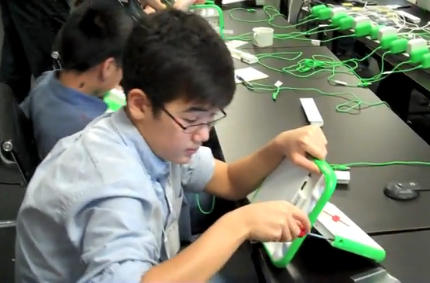
This Saturday we’re holding a repair workshop and presentation — if you haven’t torn down your XO and rebuilt it from the motherboard up, now’s your chance to try on someone else’s machine — and to learn how to break down and rebuild one in under half an hour, with nothing but a Phillips screwdriver!

We’re holding a workshop Saturday through the early afternoon. RSVP if you’re planning to come. The machines worked on will primarily be XO-1’s, since those are still the machines most likely encountered in the field. The major differences on the 1.5 make these sorts of repair much easier, not more complex — there’s little reason to take apart the bottom on a 1.5, for instance, since the keyboards just pop out.

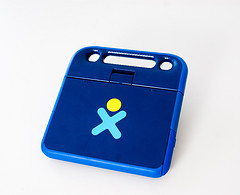
The New XO-1.5 HS: a blue, blue world

Part 2 of a review of the XO-1.5

Over 90,000 Uruguayan high school students will receive a new XO-1.5 HS (High School edition) laptop.  So how is it different from the XO-1 that their younger classmates have?

From the outside, the XO-1.5 HS has the same feel — it’s the same size, and the same antenna ears… though they feel different somehow in dark blue.  The color variation on the backplate is more limited — there may be just one set of colors to match the dark blue casing.

To make it easier to use for high school students, the keyboard features larger keys for larger fingers — and it’s now a standard responsive, ‘clicky’ keyboard rather than a waterresistant membrane. Its light/dark blue color scheme represents Uruguay’s national colors, more subtler than the bright green of the other XOs.

Since we redesigned the keyboard, we took the opportunity to make a few other handy changes. The new keyboard screws in and pops out without dismantling the bottom of the XO — taking 2 minutes rather than 15 to swap one out.

I tried it myself during my first XO teardown – the keyboard was probably the easiest thing for me to get out. We did a half tear down and photographed it, so we can also add guidelines for upgrading your disk on the 1.5’s motherboard. And now people seem to be making hybrids of XO-1.5s with the new keyboard (see our Flickr stream for more). I’ll post again when the new repair guide section is ready.

http://www.flickr.com/photos/olpc/sets/72157624651637076/

Papua New Guinea’s Jim Taylor Primary School

Earlier this month, Laura Hosman, an assistant professor following OLPC,  wrote an eloquent two-part series about her visit to the Jim Taylor Primary School in Kisap, Papua New Guinea, an hour’s drive from Mount Hagen.  This has the potential to be one of our most interesting rural deployments — and well run, as are all of the Oceania projects.  It is interesting to see how they are using their casually-scattered solar panel array.

XO power data: power draws for plugged-in laptops

Guest post by Richard Smith

We’ve finished testing power consumption while plugged into a 230V ac wall outlet for the XO-1 and the XO-1.5. The new machine performs well while suspended, and suspends very smoothly.   The 1.5 charges faster and using less power to charge the same battery.  It also draws slightly more power when in high use, thanks to its variable CPU.

See the chart below, which includes the power draw of the AC adapter.  Battery-only numbers will be significantly lower, in particular for idle and suspend, but are a bit harder to measure cleanly.  There is no comparison chart for that yet.

Power draw at the wall (XO + adapter + backlight)

Scenario XO-1 XO-1.5
Full charge 56 Wh 47 Wh
Idle 8.5W 7.2W
High 9.5W 9.7W
Suspend 5.2W 2.85W
  • Full Charge: The amount of energy it takes to completely charge a dead battery, using an adapter (power needed for bulk charging of batteries may differ).
  • Idle: Laptop sitting at the Sugar home screen, with power management disabled, backlight on full, charging.
  • High: Laptop running the Record activity’s “preview” mode.  Power management disabled, backlight on full, charging.
  • Suspend: Laptop with power management enabled, suspended, charging.

Calculating low-power options:

  • The backlight draws close to 1W – you can shave that off of the idle and high numbers turning it off.
  • Most of the power draw on suspend is to the adapter – you could view that as an upper bound on how much to factor out of the other numbers for battery-only power usage.