OLPC Workshop in Johannesburg

OLPC South Africa Foundation organized a comprehensive three day OLPC workshop conducted by OLPCA representatives from its office in Kigali on December 10 to 14, 2012.

DSC05033


The main objective of this workshop was to provide a comprehensive introduction to OLPC. The workshop also explained the tremendous milestones achieved to date in providing educational opportunities to children in developing world.

This workshop introduced the XO, its preloaded content and the Sugar learning platform to people from organizations who will be involved in preparation and implementation of large teacher trainings and deployments in South Africa.

The workshop also examined what has been learned in Rwanda during the past four years. The OLPC team from Rwanda shared its experiences, achievements, challenges and perspectives moving forward in its ongoing effort to integrate OLPC technology into the Rwandan education system.

DSC05066


OLPC South Africa Foundation invited some of its friends, associates and colleagues who will be instrumental in furthering the OLPC cause in South Africa. Invitees included individuals from the National Education Department and other thought leaders from various organizations. Approximately 25 to 30 individuals attended the workshop.

Workshop Overview

The first day of the workshop provided a general introduction to OLPC’s background, its mission, and learning philosophy. The team presented OLPC achievements to date. OLPC representatives shared an overview of different OLPC projects worldwide. The OLPC team also discussed the Rwandan experience and the lessons learned over the past four years of the project in Rwanda. The team shared galleries of children’s work from various schools in Rwanda. OLPC representatives examined the impact on learning, classroom dynamics, changes in school attendance, and the overall changes brought by XO into the families and communities in Rwanda. This busy day ended with all attendees exploring preloaded content on XO. Attendees were able to experience the uniqueness of the Sugar learning platform, which allows learners to create, share and collaborate with their peers.

On the second day, the workshop introduced the Sugar learning environment to the representatives of different organizations in attendance. It is anticipated that these organizations will be involved in preparation and implementation of next year’s large teacher trainings and deployments. Participants executed different lesson plans integrating curriculum topics. During this process, participants became familiar with the Sugar user interface and the Write, Record, Scratch, Etoys, Social Calc and Portfolio activities.

OLPC representatives shared different approaches used in Rwanda to support schools on the learning side of the project. For example, the OLPC team in Rwanda has organized XO users clubs, after school and holiday camps, and XO weekly challenges. The team has also worked with teachers to develop lesson plans that integrate use of the XO laptop. The second day concluded with an overview of what is suggested by the OLPC deployment guide and how the project has been implemented in Rwanda.

The third and last day of the workshop was focused on the technical aspects of the XO laptops. Participants were introduced to the XO’s hardware and software, the school servers and troubleshooting tips. The attendees also assembled and dissembled laptops from Kliptown project.

DSC05047


OLPC representatives concluded the workshop with additional support to the OLPC project in Kliptown. The team worked with the Kliptown youth program volunteers and Members of Pendula ICT (a technical support company) to ensure all laptops were in good conditions for use by the Kliptown afterschool program. The OLPC foundation in South Africa is committed to providing South African children with OLPC technology. Many of the lessons learned in Rwanda will be valuable as the South Africa project begins to take shape.

DSC05046

Four new Sugar Activities

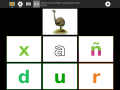
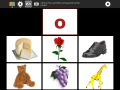
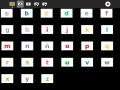
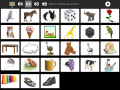
Letter Match is an activity for introducing the Spanish vowels. While far from contructionist, this activity does provide a mechanism for learning the alphabet. It displays letters and images and associated sound files, such as ‘A as in ave’. There are two modes:

  1. see a letter, then click on the corresponding picture


2. see a picture, then click on the corresponding letter


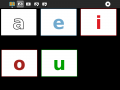
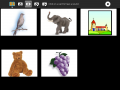
AEIOU is an activity for introducing the Spanish vowels. It displays letters and images and associated sound files, such as ‘A as in ave’. It would, of course, be fun to let the learner add their own pictures and sound recordings. There are four modes:

  1. click on the letter to hear its name
  2. click on the picture to hear the name of the first letter in the word represented by the picture
  3. hear a letter name, then click on the corresponding letter
  4. hear a letter name, then click on the corresponding picture


I Know My ABCs is an activity for introducing the Spanish alphabet. It displays letters and images and associated sound files, such as ‘A as in ave’. There are four modes:

  1. click on the letter to hear its name
  2. click on the picture to hear the name of the first letter in the word represented by the picture
  3. hear a letter name, then click on the corresponding letter
  4. hear a letter name, then click on the corresponding picture

Finally, a cool app which uses the accelerometer in XO- 4, written by a Google Code-In student:

Level Tool is an activity to check the inclination of a surface with respect to ground.


Lanedo enriches One Laptop per Child’s multitouch experience

Open source experts from Hamburg improve the devices’ software platform. Code will be available under free license to the worldwide community.

Lanedo, Hamburg-based Open Source firm, is proud to announce their contribution to OLPC’s newest device, named XO-4 touch. The 7.5“ convertible notebook, expected in 2013, focuses on multitouch technology as one of its main features.

Lanedo was involved from the very beginning to extend the OLPC sofware platform called Sugar, enhancing the user interface with touch functionality and therefore laying the foundation for future developments. The team not only improved the X.org graphical subsystem with numerous multitouch-related bug fixes, but also extended the respective functionality of the GTK+ toolkit, used for drawing windows, icons and other UI widgets.

Sugar has been a significant diferentiating factor in the worldwide user community for the XO laptop. We appreciate the support of Lanedo to continue the development and enrichment of the Sugar platform, says Rodrigo Arboleda, CEO of OLPC.

One of the most exciting features is the new intuitive text selector, that allows on-screen selection using handles for exact positioning. Furthermore, several commonly known gestures like zoom, rotate and swipe have been added to the Sugar environment, available throughout the system. Lanedo has also contributed to XO-4’s word processor, based on AbiWord, which not only had the same text selector implemented in native code, but also saw improvements in scrolling and other multitouch functions. Likewise, many other bundled applications have been enhanced.

Martyn Russell, one of Lanedo’s founders and managing director, is excited about the work done: Lanedo is proud to have had the opportunity to engage in such a noble project as One Laptop Per Child. It has been a great experience and we are thrilled at the prospect of contributing to the Open Source based platform in the future.

Following the principles of free sofware, developers can take advantage of those new features in their own projects, as all code writen will be made available freely to the benefit of the worldwide community – the GTK+ enhancements have already been incorporated in the 3.6 releases.